AI Color Analysis: How It Works and How Accurate It Is
Short answer: AI color analysis reads your undertone, depth and contrast from a selfie by measuring skin, hair and eye colour in the photo, then matches that pattern to one of the 12 seasons. It is fast and consistent, and it is only as good as the photo: daylight, no filter, a bare face. What it measures and where it needs your help are below.
AI color analysis finds your color season from one selfie by measuring undertone, depth and contrast in your skin, hair and eyes, then matching those values to the 12-season system. The result arrives in seconds and needs no quiz, no draping and no appointment.
No draping studio, no appointment, no 20-question quiz. AI color analysis reads your season from one selfie. Here is what happens in those few seconds, where it shines, and where it needs your help.
What's in this guide
What is AI color analysis?
AI color analysis uses computer vision to do what a trained color analyst does with fabric drapes: work out which colors harmonize with your natural coloring. You take a selfie, an algorithm measures the color values in your skin, and the result lands on a seasonal palette system, usually the modern 12-season model.
Professional draping is excellent but expensive and scarce, and the popular free alternative, the online quiz, asks you to eyeball your own vein color and eye pattern. Self-assessment is exactly where most people go wrong. If you have ever wanted color analysis without a quiz, where something measures your coloring instead of asking you to guess at it, this is the gap AI fills.
That said, "AI looked at my photo" can mean anything from serious color science to a novelty result generator. So it is worth understanding what a good implementation actually does, starting with the human method it imitates.
What a traditional draping session does
In a classic session, an analyst sits you facing natural daylight, makeup off, hair pulled back, a neutral gray cape over your clothes. Then comes the draping: fabric after fabric under your chin, often more than a hundred, in deliberate pairs. Warm gold against cool silver. Light against deep. Clear against muted.
The analyst is not watching the fabric; they are watching your face. The right colors smooth the skin, deepen the eyes, and define the jawline. The wrong ones amplify redness and cast gray shadows. After 60 to 120 minutes of comparisons, the analyst has, in effect, answered three questions about your coloring, and those three answers determine your season.
Sessions typically run several hundred dollars and the best studios book out weeks ahead. The method is superb; access and price are the problems AI set out to solve.
The three measurements: undertone, value, and chroma
Every seasonal system, human or AI, rests on the same three attributes. Color scientists call them hue, value, and chroma. Analysts translate them as undertone, depth, and clarity.
Undertone (hue temperature). Beneath your surface skin color sits a temperature bias. Golden or yellow-leaning skin is warm; pink or blue-leaning skin is cool; skin that sits in between, including olive skin with its subtle green cast, is neutral. Undertone is why two people who look similar in the mirror can suit completely different reds.
Value. How light or dark your overall coloring is, taking skin, hair, and eyes together. A fair-skinned, ash-blonde person has light value; someone with espresso hair and deep brown eyes has deep value.
Chroma. How clear or muted your coloring reads. High-chroma coloring has a crisp, saturated quality and can hold vivid color without being swallowed by it. Low-chroma coloring is softly blended and looks best in dusty, gently grayed shades.
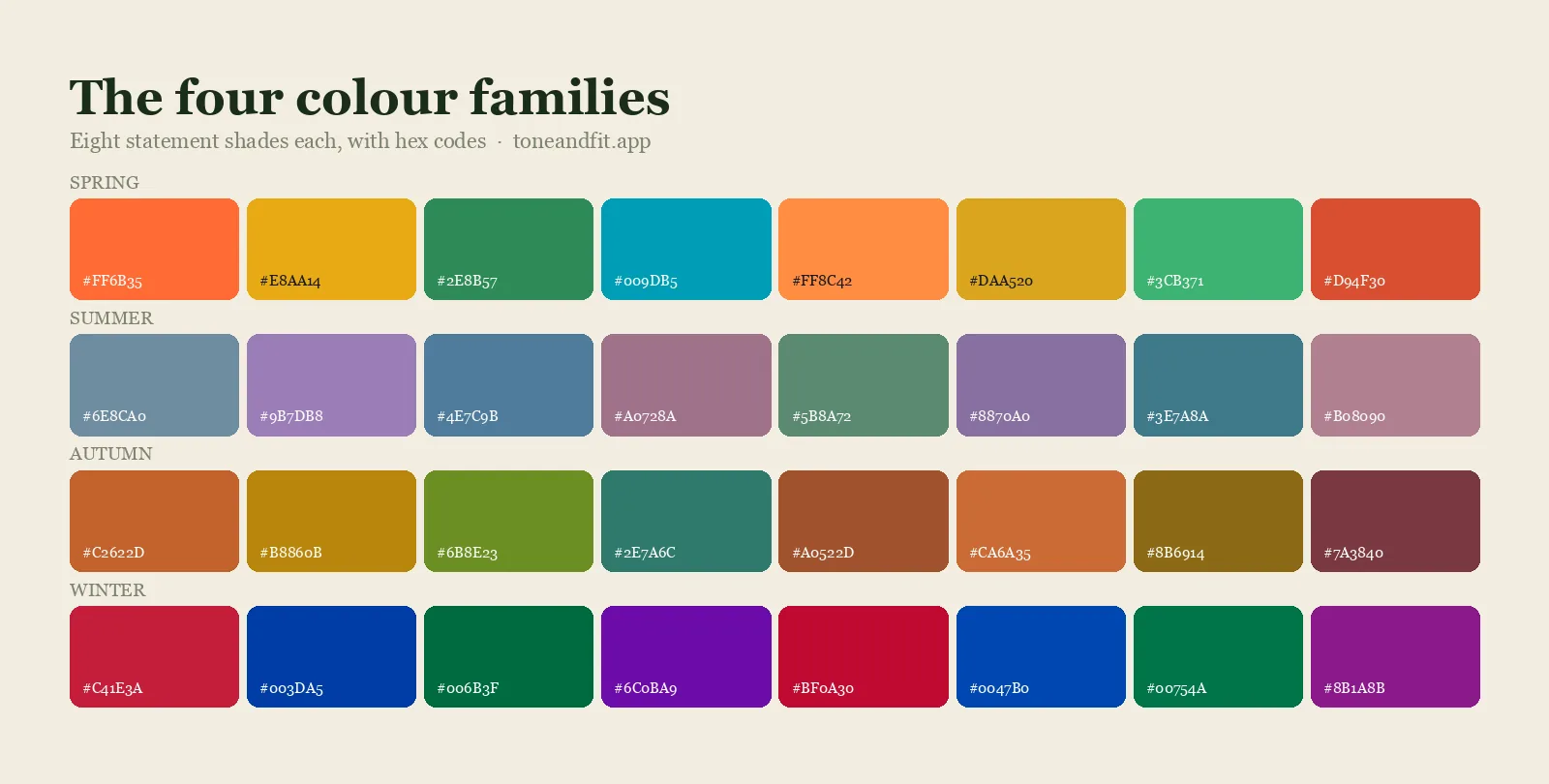
Combine the three and you get the 12 seasons, which is why modern systems label variants Light, True, Soft, and Deep: each variant tells you which measurement dominates your coloring. A human analyst estimates these three values by eye over an hour or two. An algorithm computes them from pixels. Same framework, different instrument.
How AI reads them from one photo
Here is the pipeline a well-built AI color analysis tool runs in the seconds after you take a selfie. We walk through the same five steps with worked examples in how AI color analysis works.
Step 1: Find the face
A face-detection model locates your face in the frame and maps its landmarks: eyes, brows, lips, jawline, forehead. This matters because the software must know precisely which pixels are skin and which are hair, teeth, background, or shadow. Landmarks also give it reference points, like the whites of your eyes, that become useful for the lighting step.
Step 2: Sample skin across regions
The tool does not read one pixel and call it your skin tone. It samples clusters of pixels across several zones, typically the forehead, both cheeks, and the jaw, then filters out the outliers: hot highlights on a cheekbone, shadows under the chin, blemishes, stray hair. Aggregating hundreds of samples produces a stable estimate of your true surface color instead of a lucky or unlucky pixel.
Step 3: Correct for lighting
This is the hard part, and the step that separates serious tools from toys. Every photo carries a color cast from its light source: orange from indoor bulbs, blue from shade, green from fluorescent tubes. The algorithm estimates that cast using cues like the sclera of your eyes and the overall distribution of tones, neutralizes it, and converts your skin samples into a perceptual color space where hue, lightness, and chroma sit on separate axes. Only after this normalization do the numbers mean anything.
Step 4: Compare against season profiles
Your corrected measurements now form a coordinate: a specific undertone angle, a value level, a chroma level. The software compares that coordinate against the profiles of all 12 seasons and returns the closest match. How decisively you land inside one season, and how far ahead it is of the runner-up, is what drives a confidence score. Sit squarely in True Winter and confidence is high. Sit on the border of Soft Summer and Soft Autumn, a zone human analysts argue about too, and an honest tool tells you so.
See your season in about 30 seconds.
Tone & Fit's free AI scan reads your undertone, value, and chroma from one selfie. No quiz, no account.
Scan Your Selfie Free ↗Is AI color analysis accurate? What it gets right, and where it struggles
An honest answer has two halves.
What AI gets right
Measurement and consistency. A camera sensor distinguishes color differences finer than the human eye can name, and an algorithm applies exactly the same standard to every face, every time. Give it the same clear photo twice and it returns the same season twice; even excellent human analysts cannot always promise that, because studios, daylight, and eyes all vary. Two experienced analysts can type the same client differently. Two runs of the same algorithm will not disagree with each other. AI also carries no expectations: it does not anchor on your dyed hair, your favorite lipstick, or what it typed the last five clients as.
Where it struggles
Almost everything that goes wrong happens upstream of the algorithm, in the photo itself:
- Heavy filters and beauty modes. Smoothing and glow effects rewrite the very pixels the tool needs to measure. A filtered selfie can shift your measured undertone and flatten your chroma.
- Mixed lighting. A warm lamp on one cheek and a cool window on the other creates two contradictory color casts that no correction can fully untangle.
- Strong makeup. Full-coverage foundation replaces your skin's undertone with the foundation's undertone. The scan will faithfully measure the makeup.
- Backlight and dim rooms. A bright window behind you turns your face into a silhouette, and low light adds sensor noise, leaving little clean signal to read.
Notice the pattern: the algorithm is rarely the weak link; the input is. Which means the fix is in your hands.
How to get a good scan
One minute of setup does more for accuracy than anything else:
- Use daylight, indirectly. Face a window during the day. Avoid direct sun on your face and never stand with the window behind you.
- Turn off every filter. No beauty mode, no smoothing, no vivid color setting. A plain, boring camera app is perfect. Smoothing is the worst offender because it flattens the exact skin variation the model is reading, which is why filter-based season tests go wrong.
- Bare face is ideal. If you wear makeup, at minimum skip foundation, bronzer, and strong blush for the scan.
- One light source only. All window light, or all one lamp. Never half and half.
- Fill the frame. Hold the phone at arm's length, look straight into the lens, and pull hair off your face if you can.
Good input, good measurement. If your result comes with a low confidence score, retake the photo in better light before you question the season.
Lighting is the one that catches people out, because a room can look neutral and still be nothing of the sort. Why your season looks different in every light explains what mixed sources do to a reading and how to spot a photo that was never going to work.
Prefer to work it out by eye first? The manual method, drapes and all, is written up step by step in how to do a color analysis at home, and it makes a useful cross-check against your scan.
AI vs a human consultant: an honest comparison
We build an AI color analysis app, so take this section as the view of someone with a preference, stated as fairly as we can manage.
| AI analysis | Human consultant | |
|---|---|---|
| Price | Free to try; small one-time unlock | Typically several hundred dollars per session |
| Speed | Seconds, any time | 1 to 2 hours, booked weeks out |
| Consistency | Same photo, same result | Varies by analyst and studio |
| Nuance | Measures only the photo you give it | Sees you in motion, in 3D, in context |
| Coaching | Palette, guidance, and chat in the app | Live conversation and wardrobe advice |
The honest summary: AI wins on price, speed, repeatability, and privacy. A human wins on nuance. A good consultant sees how color behaves on you in three dimensions and in movement, can re-drape a borderline case live, and folds your personality and lifestyle into the advice. If you sit firmly inside one season, AI will find it reliably and for a fraction of the cost. If you are a genuine edge case, or you want the experience and the coaching, a consultant earns the fee. Many people sensibly do both: scan first, then decide whether a session is worth it. We compare the two paths in more depth in color analysis app vs consultant.
What happens to your photo: the privacy section
A photo of your face is sensitive data, and color analysis apps handle it very differently. Before you upload your face to any tool, three questions are worth asking. Is the photo stored after analysis? Is it used to train AI models? Is it shared with anyone else?
Tone & Fit's answers are short. Your photo is analyzed and then discarded. It is never stored, never used to train models, and never shared with anyone. There is no account to create, so your scan is not attached to a name or an email address. We think that should be the default for the whole category, and it is a fair standard to hold any app to, including ours.
Try AI color analysis free with Tone & Fit
Everything this guide describes, the three measurements, the lighting correction, the season matching, is what Tone & Fit does when you scan. The scan is free: no account, no quiz, no subscription. Point the camera at your face and about 30 seconds later you have your season from the 12-season system, with Light, True, Soft, and Deep variants, plus a confidence score so you know how decisive the match is.
If you want the full toolkit, a one-time a paid tier unlock, 50% off at launch, opens your complete palette of 40+ named shades, your power shades and your avoid list, hair, makeup, and jewelry recommendations, an AI Style Assistant for outfit questions, and a draping preview that shows your face against all 12 seasonal palettes. Once, not monthly.
Small, but real, and we would rather tell you that than inflate it. Tone & Fit runs on iOS 15.1 or later.
Your season is one selfie away.
Free scan. 12-season result with a confidence score. Photo analyzed, then discarded.
Get Tone & Fit Free ↗Frequently Asked Questions
Is AI color analysis accurate?
With a clear, unfiltered daylight photo, yes. AI measures the same three attributes a trained analyst estimates by eye, undertone, value, and chroma, and it applies the same standard to every face every time. The same photo returns the same result on every run, which human analysis cannot always promise. Accuracy drops when the input is poor: heavy filters, strong makeup, or mixed lighting can all skew the measurement, which is why a good tool shows a confidence score that flags borderline results.
What photo should I use for AI color analysis?
Take a fresh selfie facing a window in indirect daylight, with every filter and beauty mode turned off. A bare face is ideal; at minimum skip foundation and heavy bronzer. Keep one light source, look straight at the camera from about arm's length, and avoid direct sun or a bright window behind you.
Does Tone & Fit store my photo?
No. Your photo is analyzed and then discarded. It is never stored, never used to train AI models, and never shared with anyone. Tone & Fit does not require an account either, so your scan is not tied to a name or an email address.
Can AI detect olive or neutral undertones?
Yes, and this is where measurement genuinely helps. Olive and neutral undertones are the ones people most often get wrong with wrist-vein tests and quizzes, because they do not fit a simple warm-or-cool binary. An algorithm measures undertone as a continuous value rather than a two-way choice, so a subtle green-leaning olive cast or a balanced neutral shows up in the numbers. Clean daylight still matters most for these subtler undertones.
AI vs professional consultant: which should I choose?
Start with AI. It is free to try, takes under a minute, and gives you a measured, repeatable baseline. Book a human consultant if you sit on a season border, want live draping and styling conversation, or simply enjoy the in-person experience. The two are complementary; many people scan first and hire a consultant later for wardrobe coaching.